


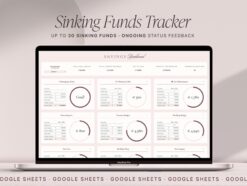


Sinking Funds Tracker for Google Sheets, Savings Planner Spreadsheet, Saving Goals Digital Envelopes, Personal Finance Planner Dashboard.
$1.90
Sinking Funds Spreadsheet, Google Sheets Savings Tracker.
Achieve your financial goals with ease using our Sinking Funds Spreadsheet Template. This user-friendly, fully automated template is designed to help you manage your savings efficiently and effectively. Whether you’re saving for a vacation, a new car, or an emergency fund, our Sinking Funds Spreadsheet makes it simple to track your progress and stay on target.
IMPORTANT !This spreadsheet is only compatible with Google Sheets, not with Excel or Numbers!
How it works:
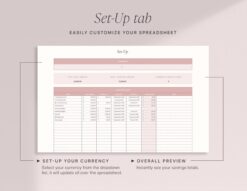
❶ Set Up Your Sinking Funds: Easily customize your sinking funds in the Set Up tab. Add a name and goal amount for each fund, and choose your goal date to instantly calculate the required monthly payment. If no start date is selected, the current date is used by default.
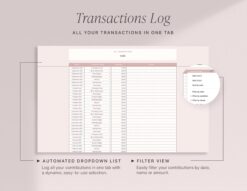
❷ Input Contributions and Withdrawals: Keep your funds up-to-date by selecting the savings fund from a dropdown list and entering the contribution amount. The spreadsheet will automatically adjust the monthly payment based on the remaining amount and goal date.
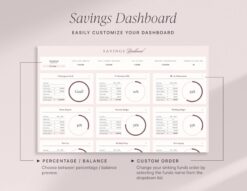
❸ Visualize Your Progress: Monitor your savings journey with the fully automated Dashboard Tab. View the balance and percentage of your goal achieved with easy-to-read visuals.
FEATURES:
• Beginner Friendly.
• Set Up guide.
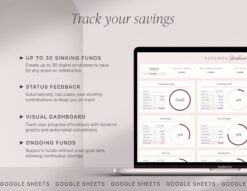
• Dashboard with up to 30 Sinking Funds.
• Visual Overview with Automatic Charts.
• Ongoing Status feedback
• Works with any currency.
• Automatic Calculates monthly payments.
• Sync the spreadsheet across multiple devices.
Why Choose Our Sinking Funds Spreadsheet Planner?
User-Friendly: Simple and intuitive design makes it easy for anyone to use.
Automated Calculations: No need for manual calculations; everything updates in real-time.
Progress Tracking: Visualize your savings progress at a glance with our automated dashboard.
Flexible and Customizable: Tailor the template to fit your specific savings goals and needs.
Take control of your finances today with our Sinking Funds Spreadsheet Template. Streamline your savings process and watch your goals become reality!
FILES INCLUDED:
• A PDF with a link to the spreadsheet template.
YOU WILL NEED:
• A device to access Google Sheets.
• A Free Google Account (Gmail).
• Basic computer knowledge.
HOW TO ACCESS THE TEMPLATE:
1. Purchase the template.
2. Receive a mail from etsy to access your purchase .
3. Download the pdf with the link to your spreadsheet (Do it on the computer or mobile browser as files are not available on the Etsy app).
4. Access the template and start planning.
More info on digital downloads and how to access them in Etsy’s help centre .
DISCLAIMER:
// Please note that this is a digital download and does not include physical product //
//The financial templates and tools don´t constitute financial advice or a recommendation. The mock text and the images are intended as examples of usage and informational purposes only, and users should seek professional advice before acting on it. //
//For personal use only, this item cannot be resold, redistributed, or used for any commercial purposes//
If you have any questions don´t hesitate to contact me through direct message. I´m always happy to help. © FutureTaxes
Only logged in customers who have purchased this product may leave a review.


Reviews
There are no reviews yet.