



Notion Garden Planner, Notion Plant Journal, Notion Plant Planner, Plant Care Tracker, Plant Watering Tracker, Plant Notion Template Garden
$24.99
Can you relate?
Managing your plants can quickly become overwhelming. From remembering when to water, to tracking fertilization schedules, it’s easy to lose track of your **plant care routine**. Whether you’re a dedicated **plant mom** or a gardening enthusiast, staying on top of everything can feel like a juggling act.
Enter: NotionMadeEasy’s My Plant Tracker.
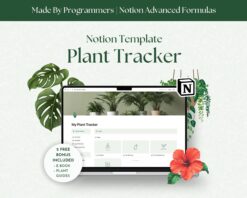
This **Notion garden planner** is designed to simplify how you organize and track every detail of your plant collection. Whether managing your **plant watering**, logging fertilization, or journaling your observations, this **Notion Template** keeps everything in one beautiful, easy-to-navigate **gardening planner**. With features designed to help you care for your plants effortlessly, you can ensure they thrive, no matter how big your garden grows.
With My Plant Tracker, you’ll have:
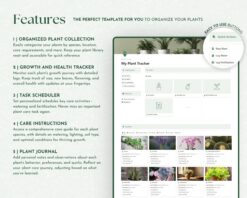
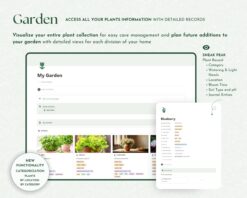
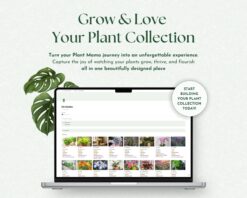
– Organized plant galleries by category: From succulents to culinary herbs, view your plants in categorized galleries with quick access to water and fertilization logs.
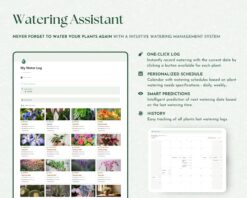
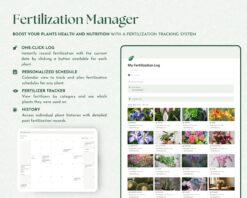
– Water and fertilization logs: Track each plant’s last and next watering or fertilization date, ensuring your plants stay healthy without the guesswork.
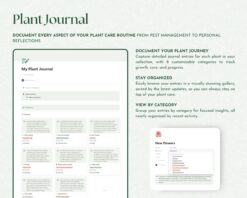
– Plant care journal: Document all your observations, from pest management to environmental changes, personal reflections, and propagation logs, all organized by plant and journal type.
– Comprehensive plant details: Keep a detailed record of each plant’s botanical name, light needs, watering frequency, soil type, and bloom time, making it easy to provide optimal care.
– Location-based organization: Sort your plants by their location—whether they’re in the kitchen, garden, or living room, you can view each plant’s specific needs and plant watering schedule.
– Visual progress tracking: Use calendar views to monitor plant watering and fertilization schedules, ensuring your plants receive care at the perfect time.
With this all-in-one Notion garden planner, you’ll have everything you need to manage your plant care easily and confidently. Whether watering, fertilizing, or reflecting on your plant journey, this tool helps you stay organized while your plants flourish.
🌿✨
### Compatibility
This Notion Template works seamlessly with:
✔️ The Notion App (Requires a free Notion account)
✔️ Any device with internet access (Desktop, Tablet, or Smartphone)
Need help getting started with Notion?
You will receive a PDF guide explaining how to easily setup your free Notion account, if you don’t have one already!
—
### How Does It Work?
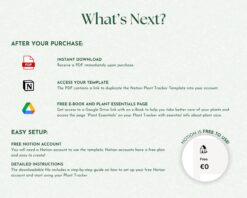
✔️ Purchase and Download Instantly via Etsy
✔️ Open the Template via the provided link
✔️ Duplicate it to your workspace (top-right corner) and start planning!
—
### Why Choose NotionMadeEasy Templates?
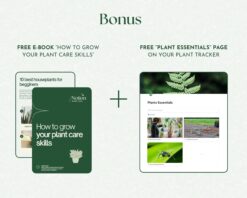
1. Exclusive Bonus eBooks: All our planners include a custom eBook to help you get the most out of your planning experience, according to the template topic.
2. Video Tutorials: Each template comes with a clear and concise video guide made 100% by us to help you hit the ground running.
3. Developed by Software Engineers: As certified programmers and Notion enthusiasts, we bring a unique, functional and professional touch to every template.
4. Notion Certified Creators: We’re officially recognized by Notion for our expertise.
5. Personal Touch: Created by a couple who met in a coding academy – Raquel, who loves painting with acrylics, and António, a fantastic cooker!
—
### What Will You Receive?
– A PDF file with links to:
✔️ Your Notion Template (ready to duplicate)
✔️ Bonus materials, including eBooks and Canva resources (where applicable)
This Notion Template for productivity is a DIGITAL ITEM, which you can access immediately after purchase and start using it – Nothing will be sent to you physically.
—
### COPYRIGHT NOTICE
This product is for personal use only. Redistribution, reselling, or any other commercial use is strictly prohibited. Protecting our intellectual property helps us continue to create high-quality resources for you.
—
### Need Help?
If you have any issues or need a custom solution, please contact us at notionmadeeasy [!at] gmail.com. We’re here to ensure you have the best experience possible!
### FAQ for Notion Made Easy
1. How do I access my Notion template after purchase?
Once your payment is confirmed, Etsy will email you a download link. The PDF includes instructions and links to duplicate the template into your Notion account.
2. Can I use these templates with a free Notion account?
Yes! All our templates are fully compatible with the free version of Notion.
3. Do I need prior experience with Notion to use these templates?
Not at all! We provide a video tutorial to guide you through customizing your template.
4. Can I customize the templates?
Absolutely! Notion templates are fully customizable to fit your preferences and needs.
5. Are these templates for personal or commercial use?
Our templates are for personal use only. Reselling, sharing, or using them commercially is not allowed.
6. What if I have issues with the template or need help?
We’re here to help! If you encounter any issues or have questions, contact us at notionmadeeasy [!at] gmail.com, and we’ll assist you.
7. What bonus materials are included?
Depending on the template, you’ll receive exclusive resources like eBooks or Canva links to enhance your experience. These are available via the Google Drive link included in the PDF.
8. Can I request a custom template?
We’re happy to consider custom requests! Send us a message, and we’ll discuss your needs.
9. Do you offer refunds or exchanges?
Due to the digital nature of our products, we don’t offer refunds or exchanges. However, if you have any issues, please contact us so we can resolve them.
10. Are you creating more templates?
Yes! We’re constantly working on new products to help you organize and streamline your life even further. Stay tuned!
Only logged in customers who have purchased this product may leave a review.
Reviews
There are no reviews yet.